
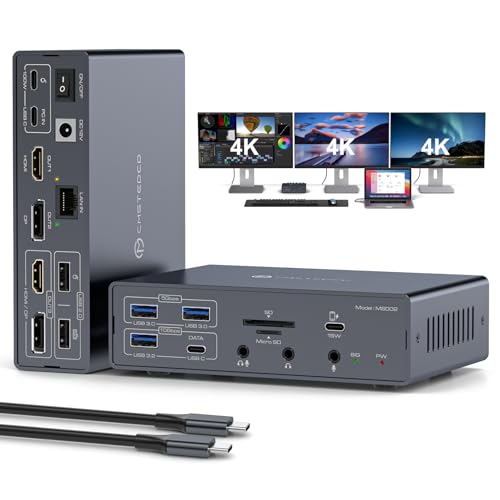
- Pre-purchase note: 1. Leveraging all features requires a Thunderbolt 3/4/5 port. Standard USB-C ports have limited support. 2.A 100W PD power adapter is not included and must be purchased separately. 3. The HDMI and DP ports (OUT 3) of the dock can only pick one of two. This means you can only connect three monitors in one of two ways: HDMI + DP + HDMI or HDMI + DP + DP.
- 19-in-1 USB C Dock: This thunderbolt 4 dock integrates 19 essential connectivity options for office, entertainment, and creative work. Video: USB-C input, HDMI + DP + HDMI/DP output; Data: 1× USB-C 3.2, 1× USB-A 3.2, 2× USB-A 3.0, 2× USB-A 2.0; Card Reader: SD + Micro SD; Network: Gigabit LAN (1000Mbps); Audio: 3.5mm headphone/mic combo jack + dedicated mic port + 3.5mm audio out; Power: 100W PD + 18W QC fast charging + 12V/3A DC
- 4K@60Hz Ultra HD:The macbook docking station breaks through MacOS limitations to enable triple-display extended mode on both Windows and MacOS systems, supporting up to three 4K@60Hz displays. Ideal for design, video editing, and multitasking needs.. Backward compatible with 2K@144Hz, 1440P@120Hz, 1080P@240Hz and more resolutions, easily connecting various devices for an immersive visual experience. For lossless transmission, use high-quality HDMI cables (≤4.9ft) or DP cables (≤3.3ft)
- Triple 4K Extended Display: The usb c docking station dual hdmi supports up to three monitors simultaneously in both mirror and extended modes. With specific drivers installed per user manual, both Windows and macOS systems support MST and SST modes (ABCD, ABCC, ABBC, ABBB, etc.). Note: Monitor 1 uses HDMI output, Monitor 2 uses DP output, and Monitor 3 can only select either HDMI or DP output. HDMI priority display when connected simultaneously
- High-Speed Data Transfer: The thunderbolt docking station features 1×USB 3.2 and 1×USB-C 3.2 ports (10Gbps) for high-speed external SSDs/HDDs; 2×USB 3.0 ports (5Gbps) for flash drives and printers; 2×USB 2.0 ports for keyboards/mice; SD+Micro SD slots for direct camera/drone file access without adapters. Gigabit Ethernet ensures more stable connections than WiFi for lag-free video conferences/gaming; supports combo headset/mic or dedicated mic for crystal-clear calls/streaming
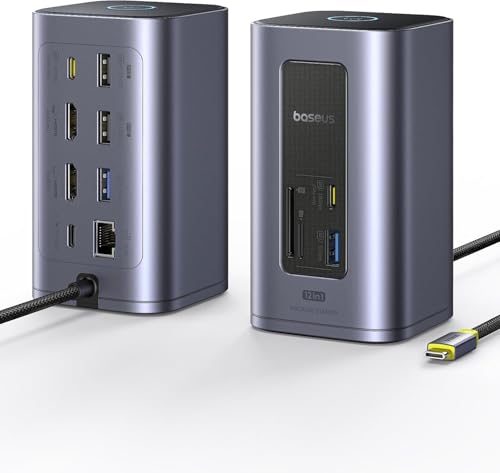
- 12 Ports, One Compact Dock: Displaylink Driver Required. Get all your essentials in one hub: 2 HDMI, 2 DisplayPort, 2 USB-C (10Gbps), 2 USB-A (5Gbps), 2 USB-A 2.0, 100W PD input, and Gigabit Ethernet. Create a clean, organized workstation with maximum connectivity. (Note: PD charger and cables not included.)
- Dual Display Expansion: Boost productivity with dual external monitors. Supports macOS (M1/M2/M3), Windows, Linux, and ChromeOS, delivering sharp 2K@60Hz visuals—ideal for multitasking, editing, and analysis
- Blazing-Fast 10Gbps Data Transfer: Streamline your workflow with lightning-fast 10Gbps data transfer. Transfer massive files in seconds and enjoy smooth, lag-free performance—perfect for video editing, 3D rendering, and heavy-duty tasks
- Smarter Power, Longer Laptop Life: Supports up to 100W PD input with dynamic power allocation. Unlike most hubs that deduct power for all ports—even unused ones—our dock reallocates all unused power back to your laptop. This ensures faster charging, longer battery life, and maximum efficiency
- Screen-Lock & Energy-Saving Mode: Press once to instantly lock your screen for privacy. Press and hold 2s to enter Energy-Saving Mode—disconnecting peripherals but keeping PD charging on. Wake your laptop the next day still at full power
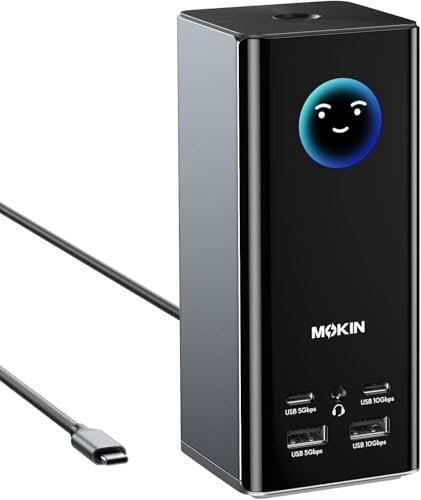
- [17-in-1 Professional Laptop Docking Station]: This all-in-one USB C Docking Station features 3 HDMI and 2 DisplayPort outputs, 2× 10 Gbps USB-C/A ports, 2× 5 Gbps USB-C/A ports, 2× USB 2.0 ports, 1Gbps Gigabit Ethernet, a 104 MB/s SD/microSD card reader, and a 3.5mm audio jack
- [Triple-Screen Dock]: Flexibly combine 3 HDMI ports + 2 DP ports to simultaneously extend three displays on Windows/macOS/Linux systems. This Docking Station 3 HDMI solves the issue that macOS does not natively support triple-screen displays, delivering 4K@60Hz video quality regardless of port configuration. (𝗙𝗹𝗲𝘅𝗶𝗯𝗹𝗲 𝘁𝗿𝗶𝗽𝗹𝗲-𝘀𝗰𝗿𝗲𝗲𝗻 𝘀𝗲𝘁𝘂𝗽𝘀: 𝗛𝗗𝗠𝗜&𝗗𝗣&𝗛𝗗𝗠𝗜; 𝗛𝗗𝗠𝗜&𝗛𝗗𝗠𝗜&𝗛𝗗𝗠𝗜; 𝗗𝗣&𝗗𝗣&𝗛𝗗𝗠𝗜)
- [True Triple 4K Display for macOS and Windows]: Expand your screen space. This docking station 3 monitors supports up to three independent 4K@60Hz monitors on compatible macOS and Windows systems, delivering crisp, lag-free visuals—ideal for creative work, programming, trading, and multitasking. Connect via USB-C, USB4, or Thunderbolt for broad laptop compatibility. 𝗡𝗼𝘁𝗲:𝗧𝗵𝗲 𝗰𝗼𝗺𝗽𝘂𝘁𝗲𝗿'𝘀 𝗨𝗦𝗕 𝗖 𝗽𝗼𝗿𝘁 𝘁𝗼 𝘀𝘂𝗽𝗽𝗼𝗿𝘁 𝘃𝗶𝗱𝗲𝗼 𝗼𝘂𝘁𝗽𝘂𝘁 𝗮𝗻𝗱 𝗽𝗹𝘂𝗴-𝗮𝗻𝗱-𝗽𝗹𝗮𝘆 𝗳𝘂𝗻𝗰𝘁𝗶𝗼𝗻𝗮𝗹𝗶𝘁𝘆 𝗮𝗻𝗱 𝗬𝗼𝘂 𝗺𝘂𝘀𝘁 𝗱𝗼𝘄𝗻𝗹𝗼𝗮𝗱 𝘁𝗵𝗲 𝗱𝗿𝗶𝘃𝗲𝗿 𝗳𝗶𝗿𝘀𝘁 𝗯𝗲𝗳𝗼𝗿𝗲 𝘆𝗼𝘂 𝗰𝗮𝗻 𝘂𝘀𝗲 𝘁𝗵𝗲 𝘃𝗶𝗱𝗲𝗼 𝗽𝗼𝗿𝘁
- [Smart LCD Digital Display & Screen Lock Button]: This MOKiN Laptop Docking Station features a built-in digital display that provides real-time feedback on charging power, resolution, and other information, allowing you to easily monitor connection status. The screen lock button protects sensitive information at any time. Its compact vertical design incorporates silicone suction cups on the base for worry-free, stable placement, redefining your workspace
- [10Gbps High-Speed Dock]: 2X 10Gbps USB-C/A + 2x USB-C/A (5G/480Mbps) + Gigabit Ethernet & Hi-Fi Audio. Multi-speed matrix supports gaming rigs & pro workflows. MOKiN docking station ensures a fast and secure transfer experience
The Best Docking Station for M3 Max in 2024: The Ultimate Guide
In today’s tech-driven world, a reliable docking station has become a necessity, especially for users of high-performance laptops like the Apple M3 Max. Many tech enthusiasts and professionals on platforms like Reddit often discuss the challenges of selecting the best docking station that meets their needs. In this extensive guide, we will explore the best docking station for M3 Max as discussed on Reddit and other tech forums, while reviewing the top 10 products available on Amazon in 2024.
Whether you’re looking for multi-monitor support, fast data transfer speeds, or extra charging ports, there’s a docking station for your needs. In this article, we will also provide a buying guide to help you make an informed decision when choosing the best docking station for M3 Max, further ensuring you have all the tools you need to expand your workspace effectively.
1. CalDigit TS3 Plus Docking Station
CalDigit has always offered high-end solutions for users requiring a professional-grade experience. The TS3 Plus is notably the best docking station for M3 Max for its array of features tailored to meet the demands of creative professionals.
This docking station includes 15 ports, including USB-A, USB-C, DisplayPort, Ethernet, and a UHS-II SD card slot, making it versatile for different peripherals. The output allows for dual 4K monitors—perfect for multitasking and design work. Additionally, its sleek aluminum design complements the MacBook aesthetic.
With a robust 87W power delivery, it can charge your device quickly while you work. Also, the CalDigit TS3 Plus supports high-speed data transfer, which is ideal for transferring larger files without lag. With user-reviews praising reliability and convenience, it’s a strong contender for those with the M3 Max.

- [15 PORTS OF CONNECTIVITY]: 2x Thunderbolt 3 40Gb/s, DisplayPort 1.2, 5x USB-A & 1 USB-C 3.1 Gen 1 (5Gb/s), 1x USB-C 3.1 Gen2 (10Gb/s data only), Gigabit Ethernet, UHS-II SD Card Slot (SD 4.0), Optical Audio (S/PDIF), 3.5mm Stereo Audio In & Out. Vertical or horizontal orientation. Sturdy full aluminum construction with integrated heat sink without a fan.
- [IMPROVED from 85W to 87W LAPTOP CHARGING]: Provides up to 87W to charge your laptop and power all of your USB peripherals. The secondary Thunderbolt 3 port provides 15W of power for downstream devices.
- [DUAL 4K EXTENDED DISPLAYS]: Connect up to two 4K@60Hz (4096 x 2160 30-bit color) monitors via DisplayPort and Thunderbolt 3 / USB-C port, OR a Single 5K@60Hz display can be supported via the Thunderbolt 3 port. **M1 Macs cannot support dual display over Thunderbolt! (***DisplayPort to HDMI/DVI/VGA adapter / cable must be an ACTIVE type. Passive dongles/cables will not work.***)
- [UHS-II SD 4.0 CARD SLOT]: Latest UHS-II SD card slot supports SD/SDHC/SDXC at up to 312 MB/s bus speed. Transfer full days of footage from your camera 3x faster than UHS-I counterpart!
- [MAC & WINDOWS COMPATIBLE]: Ideal for M1, M2, M3, M5 Macs, 2016+ MacBook Pro, 2017+ iMac Pro, iPad Pro with Thunderbolt, on Mac OS 10.12 or Windows 8/10 with a Thunderbolt 3, Thunderbolt 4, or Thunderbolt 5 port. **Your host device (computer/tablet) must have at least a Thunderbolt 3 port to use the CalDigit TS3 Plus**
2. Anker PowerExpand Elite Thunderbolt 3 Dock
Anker has long been recognized for providing quality charging solutions, and their PowerExpand Elite Dock is no exception. This docking station is a favorite among M3 Max users due to its Thunderbolt 3 capabilities, allowing for high-speed connectivity and power delivery.
The docking station features 13 ports: 2 Thunderbolt 3 ports, HDMI, USB-A, and a 100W PD port, enabling connections for various devices and monitors. The highly praised ability to connect dual 4K displays at 60Hz enhances productivity significantly. Users appreciate the compact design, which makes it easy to transport while offering phenomenal performance.
What sets it apart is its reliability, and the widespread positive feedback on Reddit confirms that Anker provides top-notch customer service and a trustworthy product.
No products found.
3. Dell WD19 Docking Station
The Dell WD19 is an impressive docking station with robust features catering to both home and office setups. It supports an array of connection options, including USB-C and HDMI, with a total of 13 ports making it incredibly versatile for an M3 Max user.
With the ability to connect dual 4K monitors, the Dell WD19 excels in delivering both power and performance. Its modular design allows for easy upgrades, making it a future-proof solution. Dell has equipped this docking station with a 180W power adapter, ensuring sufficient power supply, even when multiple peripherals are connected.
Reddit discussions have highlighted its stability and ease of use, particularly in video and photo editing tasks where multiple screens are essential.
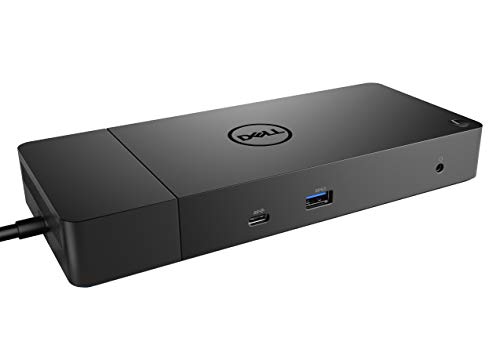
- Ports: 1x USB-C 3.1 (Gen 2), 1x USB-A 3.1 (Gen 1 with PowerShare), 2x USB-A 3.1 (Gen 1), 1x Combo Audio/ Headset, 1x Audio Out.
- Ports: 2x DisplayPort 1.4, 1x HDMI, 1x USB-C Multifunction DisplayPort, 1x Gigabit Ethernet RJ45.
- Power: Power Adapter 180 Watt AC 120/230 V (50/60 Hz). Docking Interface: USB-C. Cable Included: 1x SuperSpeed USB-C Cable (3.3 Ft).
- Dimensions: 8.1 x 3.5 x 1.1 inches. Weight: 20.63 oz.
- See Description for Important Compatibility Information.
4. Kensington SD4700P USB-C Docking Station
For users looking for a straightforward and efficient docking solution, the Kensington SD4700P is a favorite for M3 Max enthusiasts. With USB-C and HDMI connections, this dock accommodates various devices seamlessly and supports dual 4K signals.
This docking station comes with 10 ports, including USB-A and Ethernet, combining versatility with functionality. The 60W power delivery is an additional advantage for M3 Max users, allowing for fast charging on the go.
The design is sleek and compact, making it a great choice for both home and travel. M3 Max users on platforms like Reddit praise the easy setup and compatibility with various operating systems.
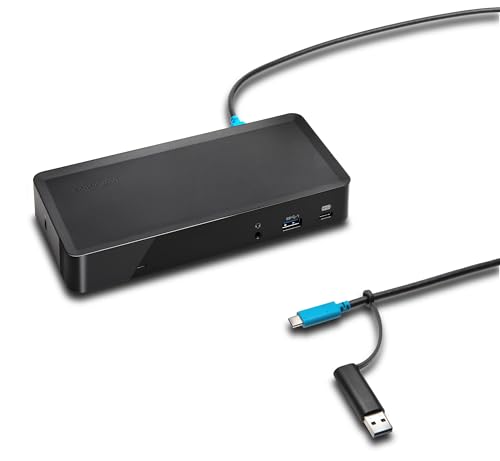
- Docking station for any MacBook chipset provides dual 2K display (M1/M2/M3/M4 regular/Pro/Max all supported); also built for Windows PC’s
- Supports M1, M2, M3 and M4 MacBooks using an easily installed driver from DisplayLink
- Supports Thunderbolt 4, USB4, USB-C and USB-A laptops running macOS 11 or above and Windows 10 or above
- Dual monitor dock provides Dual or Single 2k@60Hz via DisplayLink; 1 HDMI 2.0 port and 1 DisplayPort 1.2++; DisplayPort connections can use a passive cable (see part# K33021WW)
- 1M USB-C cable (included) connects the dock to your device; 135W power provides up to 60W laptop charging (windows laptop must accept Power Delivery) plus power for peripherals; for charging USB-A laptops or USB-A Surface devices with up to 60W, use our optional power splitter part# K38310NA
5. Plugable USB-C Triple Display Docking Station
As a unique option, the Plugable USB-C Docking Station stands out for users who prioritize multiple display options. It can connect up to three monitors, making it a fantastic choice for multitaskers.
Equipped with HDMI, DisplayPort, and USB-C connections, it supports up to two 4K displays and one 1080p display at the same time. With a robust selection of 11 ports, users can connect various devices, ensuring everything is accessible to them seamlessly.
The 60W charging power delivery is adequate for most daily tasks, and users frequently report appreciating its straightforward setup and reliable performance, which is often discussed on Reddit as a valued asset for M3 Max users.
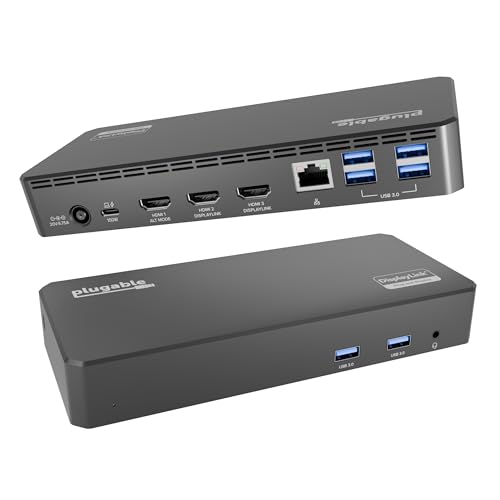
- Enterprise-Grade 12-in-1 Expansion for Hybrid Teams: Designed for compatibility with USB-C, USB4, or Thunderbolt laptops on Windows, macOS, or ChromeOS environments. Enables up to 3 HDMI monitors, wired Gigabit Ethernet network access, 6x USB 3.0 peripherals, audio, and device charging. Perfect for organizations looking to streamline IT deployments in hot-desking and managed office workspaces that demand reliable networking and easy device connectivity.
- Triple Display USB-C Docking Station: Maximize productivity with support for up to three extended HDMI displays (1× 4K @ 30Hz via Alt Mode, 2× 1080p @ 60Hz via DisplayLink). Bypasses native single-display limitations on platforms like Apple M1/M2/M3/Neo MacBooks. Compatible with all newer Apple Silicon systems, including M4 and M5. Optimized for enterprise use cases such as data analysis, presentations, and conferencing, it transforms any notebook into a multi-monitor workstation for your hybrid workforce.
- Advanced USB-C Functionality: Integrated DisplayLink graphics technology and native USB-C video output (Alt Mode) are essential for maximizing workstation productivity, delivering full, native, high-performance multi-display support, while 100W USB-C Power Delivery ensures continuous host system charging in enterprise environments.
- Universal Compatibility: Engineered for seamless integration with USB Type-C, USB4, and Thunderbolt-enabled systems across macOS (11+ with driver installation), Windows, and ChromeOS (v100+). that support USB-C Alt Mode and Power Delivery. Ideal for mixed-fleet IT environments, fully compatible with Dell XPS and Latitude, HP EliteBook and ProBook, Lenovo ThinkPad, and MacBook M series laptops, and more. Not compatible with Linux; HDCP not supported.
- Expert Lifetime Support: Backed by North American-based technical support and our compatibility guarantee if something doesn’t work, we’ll make it right. Trusted by IT professionals worldwide, Plugable provides direct access to the engineers who design our products for deployment assistance, troubleshooting, and lifecycle support. We resolve issues quickly to minimize downtime and help organizations maintain productivity at scale.
6. j5create USB-C Dual HDMI Docking Station
For creatives needing a dual monitor setup, the j5create USB-C Dual HDMI Dock is an affordable and reliable choice. It’s a lightweight docking station that supports dual 4K HDMI displays at 30Hz.
With a mix of USB-C, USB-A, and HDMI ports, it’s well-equipped for various devices. The power delivery of 60W ensures that your M3 Max stays charged without disruption. Users on Reddit have highlighted that its compact design and portability make it an appealing choice for those who are frequently on the move.

- This dual display docking station adds dual HDMI monitors, with resolution support up to 4K (3840 x 2160) on one display and up to 2K (2048 x1152) or 1080p on the other display. You can also use your laptop screen for three displays in total, making it easy to access multiple applications at once. Note: Driver installation required for Mac users, please refer to the user manual and driver download page.
- This USB 3.0 docking station comes equipped with all the connections you need including three USB 3.0 ports, a RJ45 Gigabit Ethernet port, memory card reader/writer, combo audio jack, and a USB-C port supporting up to 100W Power Delivery.
- With its slim and heat-dissipating design along with the double-sided cable storage compartment, this USB-C dock ensures an easy connection regardless of your USB-C port’s location and can easily fit into any workspace environment.
- It also includes a security lock slot to protect against theft, making it perfect for use in business organizations.
- Compatible with Thunderbolt 3/4, the universal USB-C connection works with Windows and macOS.
7. ASUS USB-C Dock DOCK CHROMA
ASUS offers an attractive option with the USB-C Dock DOCK CHROMA, known for stylish design and RGB lighting. This docking station is ideal for M3 Max users who want to combine aesthetics with functionality.
It includes multiple ports, such as USB-A, USB-C, and HDMI, allowing for ample connectivity. The unique RGB lighting can be customized through the ASUS software, making it a fun addition to a workspace.
While its power delivery cap at 60W may not be suitable for high-performance users, Reddit users appreciate the design, ease of use, and versatility it offers.
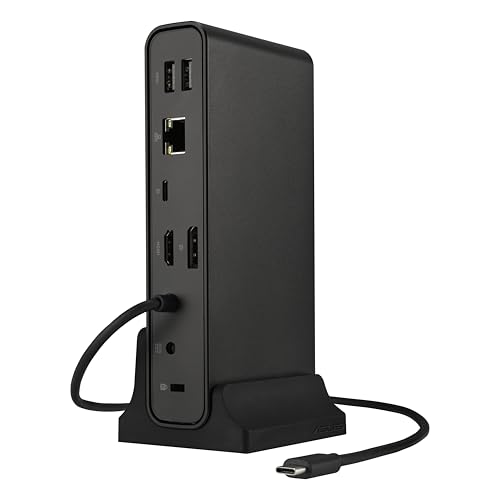
- Connectivity Technology: Wired
- Charging Capability: Yes
- Device Supported: Mouse
- Device Supported: Keyboard
- Device Supported: Monitor
8. IOGEAR Dock Pro 4K Docking Station
IOGEAR is another brand worth considering, especially with its Dock Pro 4K Docking Station. This option supports dual 4K displays and offers a variety of ports, including USB-A, USB-C, and Ethernet to meet any connectivity requirements.
The power delivery of 60W ensures that your M3 Max remains charged throughout the day. Users have shared positive feedback on Reddit regarding its performance reliability and the ability to easily connect various external devices.
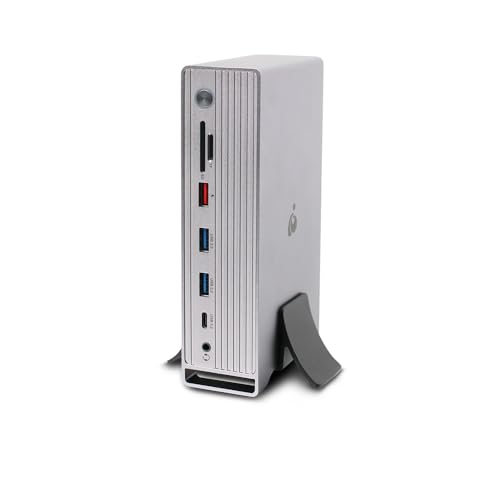
- IOGEAR DOCK PRO UNIVERSAL 4K QUAD DOCKING STATION
9. Sabrent 4-Port USB 3.0 HUB with Ethernet Adapter
If your needs are minimal, the Sabrent 4-Port USB 3.0 HUB with Ethernet Adapter could be the perfect match for your M3 Max. This product is ideal for users seeking a budget-friendly solution that supports basic connectivity without all the extra fuss.
While it isn’t a full-blown docking station, it allows you to connect additional USB devices and offers an Ethernet port which can be Vital for stable internet access. It’s perfect for those who simply wish to extend the number of USB ports on their laptop.
Review discussions on Reddit suggest that users love its simplicity and efficiency, making it a hit among minimalists.

- Instantly Add Four USB 3.0 Ports to Any Compatible Device
- Individual Power Switches with LED Indicators
- Supports Transfer Speeds up to 5Gbps (USB 3.0), 480Mbps (USB 2.0), 12Mbps (USB 1.1)
- 2.5 Amp Power Adapter Included to Power up Your Devices
- Easy Setup: Plug & Play, Hot Swappable
10. ElecHive USB-C Docking Station
The ElecHive USB-C Docking Station may not be the flashiest option, but it delivers reliable performance and compatibility with the M3 Max. With a variety of ports including USB-A, HDMI, and SD card slots, this dock can cover most casual users’ needs.
Equipped with a 60W power delivery feature, it ensures that your device stays charged while using multiple peripherals. Users appreciate its compact and travel-friendly design, which makes it a top recommendation on platforms such as Reddit for portability.
No products found.
Buying Guide: How to Choose the Best Docking Station for M3 Max
When searching for the best docking station for M3 Max, there are several key factors to consider. Below, we’ll break down essential criteria that can help you make an informed decision.
1. Compatibility
Not all docking stations are created equal in terms of compatibility. Ensure that the docking station you choose works seamlessly with your M3 Max. Look for docks specifically designed for Mac devices.
2. Number of Ports
Consider how many peripherals you plan to connect. Ensure the docking station has an ample number of USB-A, USB-C, HDMI, and any other connections you may require.
3. Power Delivery
Power delivery capabilities can vary, so check for how much wattage the docking station supports. Higher wattage is essential for intensive use, especially with power-hungry devices like the M3 Max.
4. Display Support
Check that the dock can support your desired monitor configurations. For sculpting and video editing tasks, dual or triple display options may be required.
5. Build Quality
Look for docks that offer robust construction. Aluminum designs often deliver sturdiness and durability, making them a great choice for daily use.
6. User Reviews
Always read user reviews, especially on platforms like Reddit. Real-world experiences can provide insights into the durability, issues, and reliability of each docking station.
7. Price
Set a budget before shopping. Docking stations can vary widely in price, and it is crucial to find one that ticks all your boxes while remaining within your budget.
8. Portability
If you plan to travel with your dock, opt for a lightweight, compact version that can easily fit in your bag without adding bulk.
Final Thoughts
Choosing the best docking station for M3 Max in 2024 is all about aligning features with your personal or professional needs. By considering factors such as compatibility, port availability, and power delivery, you will be better equipped to make an informed choice. The options provided above reflect some of the most recommended models from Amazon, aligning with what tech enthusiasts on Reddit have appreciated in their daily use. Happy docking!
Last update on 2026-08-20 / Affiliate links / Images from Amazon Product Advertising API | hishecozy.com is a participant in the Amazon Associate program and will earn from qualifying purchases.
